
A behind-the-scenes look at manual accessibility reviews.
A product manager once asked us, mid-project, why a "simple accessibility check" was taking so long. The team had already run Lighthouse. Ninety-something score. Green across the board. From where they sat, the work looked finished before it started.
We explained that we hadn't opened a screen reader yet.
That conversation happens more often than people expect. Somewhere between "we ran a scanner" and "we have an accessibility audit," there's a gap most teams don't see, and it's usually the most important part of the process.
This is what actually happens in that gap.
Before we open a screen reader
Before testing a single page, we spend time understanding what the product actually does and who relies on it to get their work done. A patient portal, an internal claims system, and a marketing site all need different audit plans, even if every one of them technically "needs to meet WCAG."
We ask for role-based logins if the product has them, because an admin dashboard and a customer-facing view often behave completely differently under a screen reader. Permissions change what's on the page, and what's on the page changes what needs testing. We map out the critical journeys, not just the page count — completing a form, uploading a document, filtering a table, checking out, scheduling an appointment. A twelve-page marketing site and a five-screen onboarding flow with fourteen conditional states aren't scoped the same way, even when the second one technically has fewer total pages.
Only after that do we decide which browsers, screen readers, and zoom levels are actually worth testing for this particular product. Skipping this step is exactly how audits become inconsistent — testing whatever's convenient instead of what the actual audience relies on.
The pairings matter more than people expect. NVDA gets tested with Chrome, JAWS with Edge, VoiceOver with Safari, because that's roughly how real users actually combine them, and testing NVDA against a browser almost nobody in the client's audience uses tells you very little. An audit that only checks one browser and one screen reader combination is really only checking one narrow slice of how people actually experience the product.
What a green scanner result actually means
Automated tools are genuinely useful, and we run them early in every audit. They catch missing alt attributes, obvious contrast failures, unlabeled form fields, and duplicate IDs quickly, and there's no reason to go looking for those manually when a scanner flags them in seconds.
What they can't do is tell you whether the experience actually works.
We've had a custom dropdown component pass an automated scan cleanly — no errors, no warnings — because every element technically had a role and a name. It took less than a minute with a keyboard to find that pressing Escape didn't close it, and that focus, once inside, never returned to the trigger button. A sighted mouse user would never notice. Someone navigating by keyboard gets stuck.
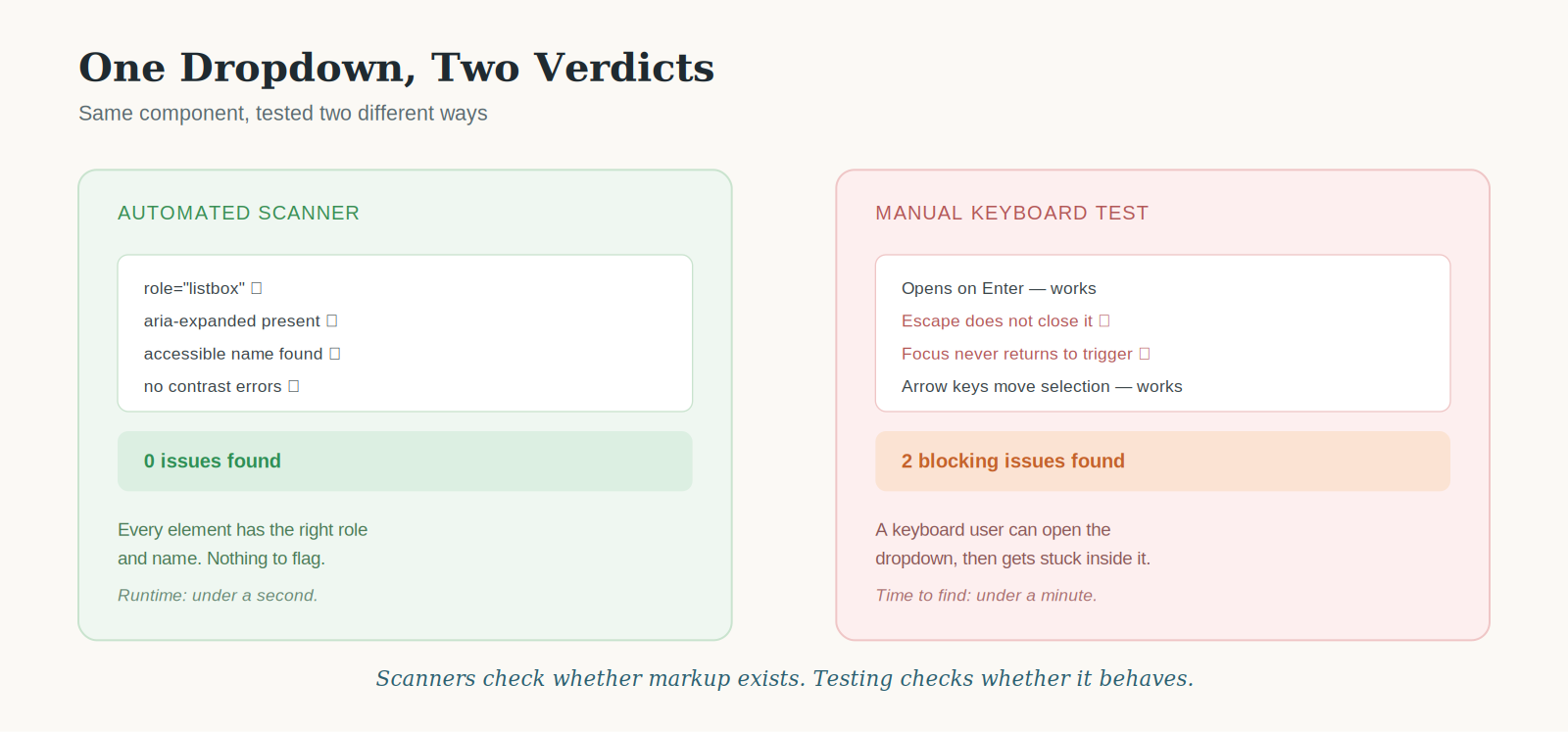
The same dropdown, judged two different ways.
Scanners check whether markup exists. They can't judge whether it behaves the way a real interaction demands. That distinction is most of what separates an automated report from an actual accessibility audit.
Walking through the product like different users
This is where most of the audit time actually goes, and it's less about checking boxes against WCAG criteria than it sounds.
We start keyboard-only, no mouse, tabbing through the entire flow the way someone with a motor impairment would have to. We're watching where focus lands, whether it's visible, whether the order makes sense, and whether anything traps us somewhere we can't tab back out of. Modals are a common offender here; we've lost count of how many close buttons are technically present but never actually receive focus.
Then we switch to a screen reader — usually NVDA first, then VoiceOver, sometimes JAWS depending on the client's user base. We're listening for what gets announced and, just as often, what doesn't. Forms are where this shows up hardest. A validation error that appears visually but never gets read aloud is invisible to someone who can't see the red text appear.
From there we test at 200% and then 400% zoom, checking whether content reflows or just gets clipped off the edge of the viewport. We test with a color-independent view to check whether anything depends on color alone to communicate meaning. And on mobile, we're checking tap target size and whether content reflows for a narrow viewport instead of forcing pinch-zoom to read anything.
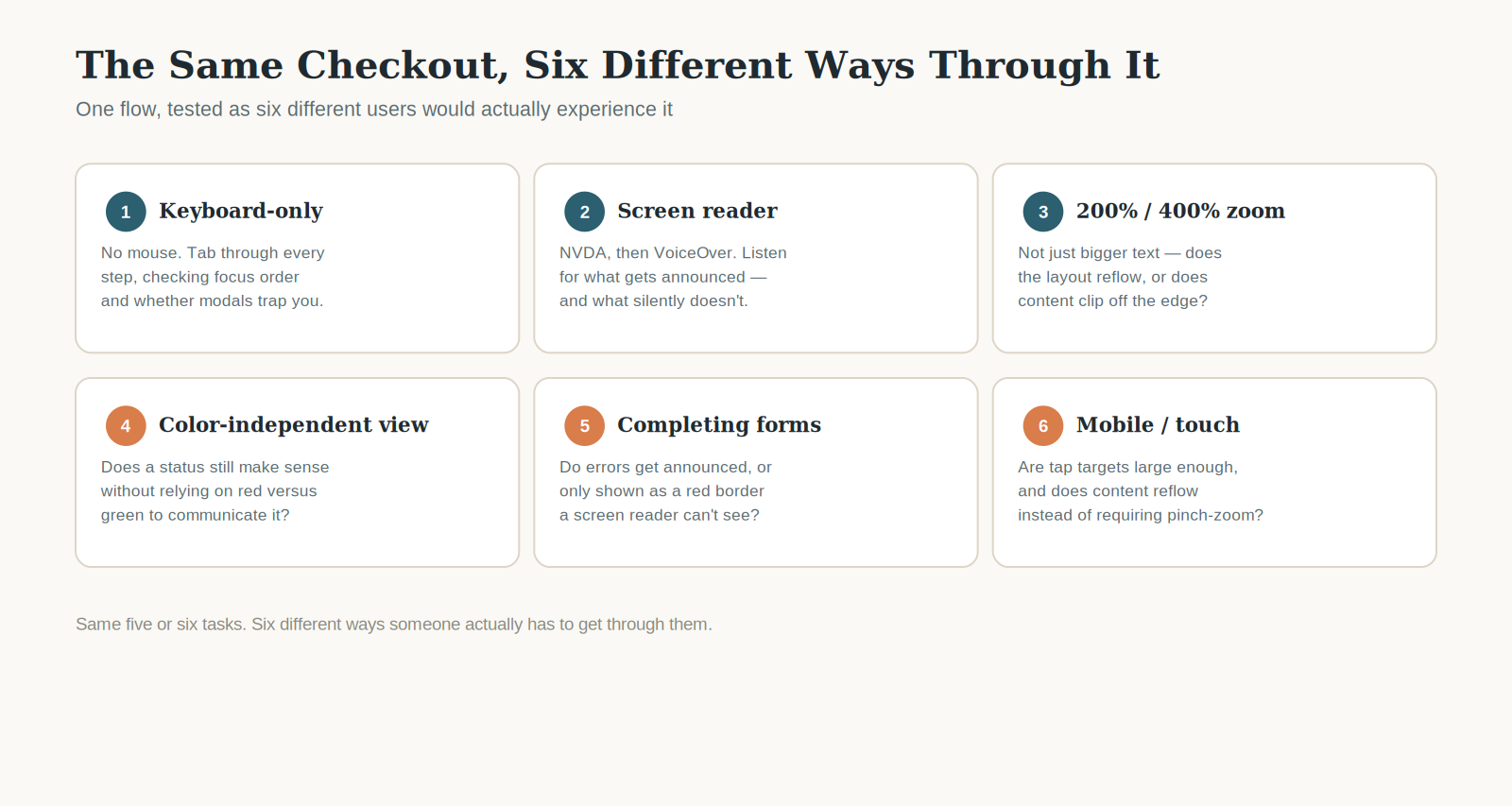
Six lenses, one flow.
None of this is really about running through a checklist of success criteria in order. It's closer to trying to complete the same five or six real tasks the way five or six different people would actually have to complete them, and noting everywhere the experience breaks down.
Looking beyond the screen
Testing what's on screen is half the work. The other half happens in the code.
We open the DOM and check whether headings are actually structured as headings, not just styled to look like them. We check whether a button is an actual button element or a div with a click handler and nothing else, because the second one is invisible to a screen reader unless someone specifically added role and tabindex — and even then it often still doesn't respond correctly to Enter or Space. We check ARIA usage carefully, because ARIA that's misapplied is often worse than no ARIA at all.
Focus order gets checked in the markup, not just visually, because visual order and DOM order don't always match, especially in anything built with CSS grid or flexbox reordering. Data tables get their own pass — a table missing scope attributes on its header cells might look perfectly normal, until a screen reader user lands three rows down and has no way to know which column they're actually in.
Turning an observation into evidence
Noticing a problem and documenting it well enough for a developer to actually fix it are two different skills.
For every issue, we capture a screenshot or a short screen recording, and where relevant, the actual screen reader output, word for word, not paraphrased. We write specific reproduction steps: which page, which browser, which assistive technology, which exact interaction. We include the relevant markup, because "the button isn't accessible" tells a developer almost nothing, while "the icon button has no accessible name; add aria-label="Close"" tells them exactly what to change.
Every finding gets mapped to a specific WCAG 2.2 success criterion, because that mapping is what eventually rolls up into conformance ratings for a VPAT, and vague findings produce vague ratings.
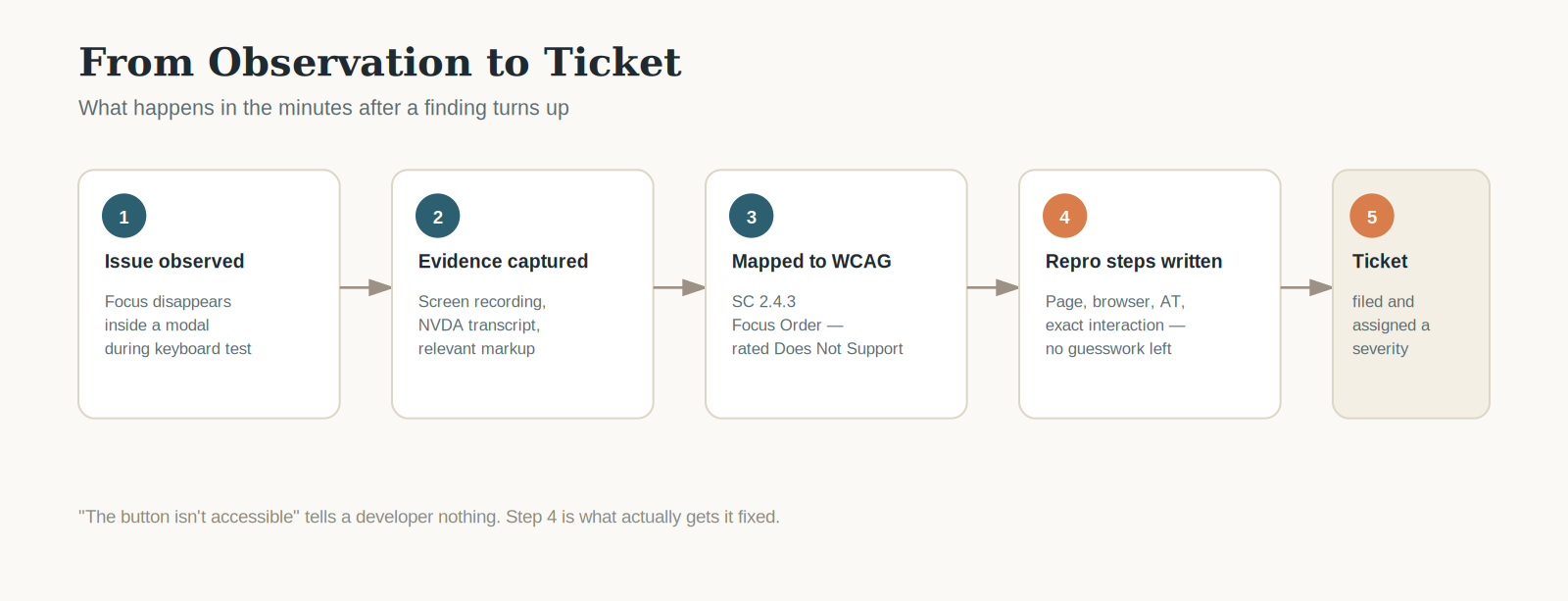
What happens in the minutes after a finding turns up.
Each ticket also gets a severity, and that rating isn't arbitrary. A keyboard trap inside a checkout flow blocks a task entirely, so it's critical. A missing alt attribute on a decorative background image is real but rarely blocking, so it's logged as low.
Working with developers
The audit isn't finished when the report ships. If anything, that's when the more useful conversations start.
Developers ask why something is rated "Does Not Support" instead of "Partially Supports," and that distinction usually needs explaining in context, not just cited by criterion number. We retest every remediated item against the same evidence we originally captured, not from memory, and only update the conformance report once a fix has actually been verified.
Why this still needs a person
None of this is an argument against automation. Scanners are fast, consistent, and genuinely catch things worth catching early.
What they can't do is judge whether a modal actually traps focus correctly, whether an error message is actually useful once you can't see the screen, or whether the order content gets read in tells a coherent story. Those require judgment, not pattern matching.
A finished accessibility audit report might land at fifty pages. Client-facing, clean, organized by severity and WCAG criterion. What it represents is closer to a week or two of testing keyboard flows, listening to screen reader output, reading through markup, writing reproduction steps precise enough for a developer to act on without back-and-forth, and reviewing findings internally before anything gets sent out.
That's what a client is actually paying for when they commission a manual accessibility audit — not fifty pages of findings, but the investigation behind them.